Video Content Management System: Guide to Features & Choice
Your video folder probably looks familiar. A webinar recording sits next to a podcast export, three social clips, two caption files, and a mystery file called final_final_v2.mp4. One version is cropped for Reels. Another has the wrong intro. The thumbnail is somewhere in Slack. The transcript lives in a Google Doc. When you need one clean clip for LinkedIn, you spend more time searching than publishing.
That mess doesn't stay small for long. Once video becomes part of your marketing, sales, training, or content strategy, file chaos turns into workflow chaos. People reuse the wrong version, forget where footage lives, and rebuild assets that already exist.
A video content management system starts to matter. Not as a dusty enterprise archive. Not as an IT-only tool. Think of it as the operating system for your video workflow: one place to collect footage, organize it, turn it into usable assets, publish it, and track what happened after it went live.
The shift happened because video stopped being a side format. According to the Cisco Annual Internet Report, video content was projected to account for 82% of all global internet traffic by 2022 (Cisco Annual Internet Report reference). When video dominates attention at that scale, managing it stops being a storage problem and becomes a business function.
Table of Contents
- Content intelligence that saves time
- Delivery features that protect the viewing experience
- Insights that help you make better videos
Introduction Why Your Messy Video Files Need a Manager
A creator records a long interview on Monday. On Tuesday, they pull a short clip for TikTok. By Wednesday, a client asks for the full version with captions. On Thursday, someone on the team needs a quote for an email campaign. The footage exists. The value exists. But the workflow breaks because nothing is organized around reuse.
That's the first place people get confused about a video content management system. They assume it's just storage for large files. It isn't. Cloud storage can hold a video. A VCMS helps you work with it.
The real problem isn't file size
Large files are annoying, but they aren't the biggest issue. The bigger problem is fragmentation. Your raw footage may live on a hard drive, edits in Adobe Premiere Pro or Final Cut Pro, captions in another tool, approvals in email, and publishing inside separate social schedulers.
When that happens, every new video asks your team to repeat the same scavenger hunt.
Practical rule: If you can't find, reuse, edit, publish, and measure a video from one connected workflow, you don't really have a system. You have a pile of tools.
A good video content management system gives that pile structure. It becomes the central manager for the whole lifecycle:
- One home for source files so teams stop asking who has the latest export
- Searchable organization so you can find clips by title, topic, speaker, or transcript
- Transformation tools so one recording can become many assets
- Distribution controls so publishing isn't handled manually every time
- Performance tracking so you know what content moved the needle
Why this matters to creators, not just enterprises
The term VCMS sounds corporate, which makes many solo creators ignore it until the pain becomes obvious. But the same problem hits a YouTuber, coach, or agency much earlier than they expect. Once you create content regularly, your backlog becomes a library. And if that library isn't usable, it becomes dead weight.
The old view of video management was passive. Store files safely. Keep permissions tight. Archive recordings for later. That still matters for some organizations, especially those with internal training or compliance needs.
For creators and marketers, though, the more urgent question is simpler: can this system help me turn one video into many useful pieces without losing my mind?
That's the modern shift. A VCMS isn't only where videos go to live. It's where videos go to become more valuable.
What a Video Content Management System Actually Does
A VCMS is better understood when approached not as software, but as a digital studio manager. A good studio manager doesn't just lock footage in a cabinet. They receive material, label it, prep it for different uses, send it where it needs to go, and report back on what performed.
That's the job.
The simple way to think about a VCMS
A video content management system handles the full journey of a video after recording. It brings order to the messy middle between “we filmed something” and “that content is now working across channels.”
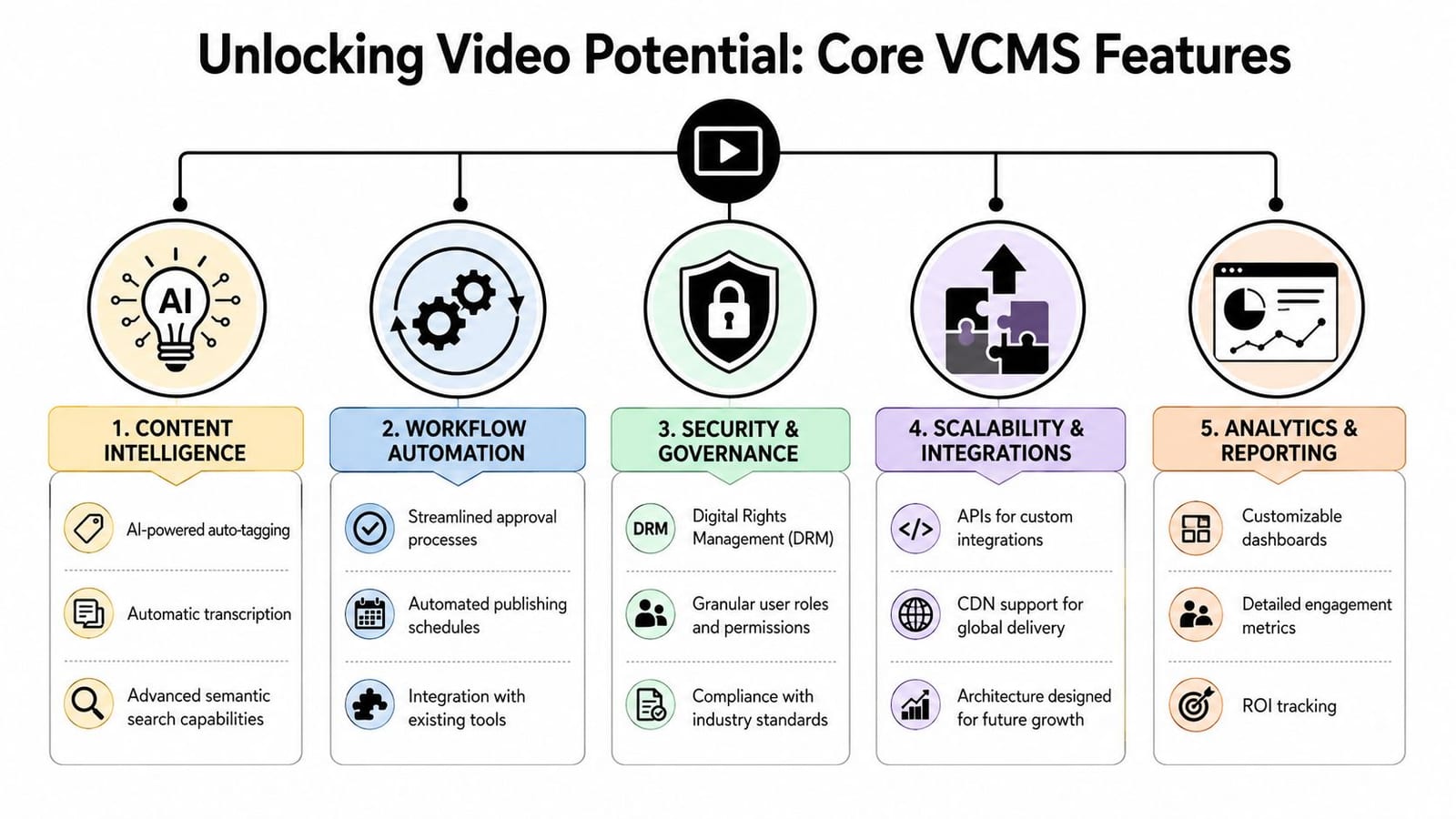
Here's a visual way to break that down:
If your team also runs paid campaigns, it helps to understand how managed video assets feed distribution decisions. Adwave's guide to programmatic video advertising strategies is useful context because it shows how organized video operations support paid delivery, not just content storage.
The five jobs it handles
Ingest
This is the intake step. You upload raw footage, finished edits, webinar recordings, screen shares, product demos, or livestream files into one place.
For a marketer, that might mean moving event footage, testimonial videos, and ad creatives out of scattered drives and into a shared library. For a podcaster, it might mean every episode recording lands in the same workspace instead of being buried in local folders.
Organize
A VCMS earns its keep by using folders, tags, transcripts, metadata, and sometimes AI labeling so you can find things later.
Without this layer, your library becomes a black hole. With it, you can search for “pricing objection,” “client testimonial,” or a speaker's name and surface the right clip quickly.
A strong system doesn't ask you to remember filenames. It helps you search by meaning.
Transform
This is the part many people don't expect. A VCMS often prepares video for different uses. That can include transcoding into different formats, clipping highlights, generating subtitles, resizing for vertical or square layouts, or creating platform-ready versions.
If you've ever exported the same video three times just to fit different channels, you already understand why this matters.
Distribute
A useful system doesn't stop at editing and organization. It also helps publish or deliver content where audiences will see it, whether that's a website, private training portal, internal team hub, YouTube channel, or social platform.
Distribution is where old-style video archives start to feel limited. They store. They don't move.
Analyze
Once the video is live, a VCMS can track engagement signals like where viewers stop watching, which clips hold attention, and what format performs better on different channels.
That closes the loop. Your library stops being a graveyard of old footage and becomes a feedback system for better future content.
Core Features and Capabilities to Look For
If you're comparing platforms, feature lists can get technical fast. The trick is to translate each feature into the workflow problem it solves. Don't ask only, “Does it have this feature?” Ask, “What frustration disappears if it works well?”
A modern video content management system should help with three things: finding content, delivering content, and learning from content.
Content intelligence that saves time
The first category is content intelligence. This includes transcription, tagging, searchable captions, scene detection, and clip extraction.
Transcription matters because spoken words become searchable text. Instead of scrubbing through a 45-minute interview, you search the transcript and jump to the exact moment you need. If you want to see how this works in practice, an AI video transcript generator shows why transcripts aren't just accessibility add-ons. They're retrieval tools.
Look for capabilities like:
- Automatic transcription so every spoken line becomes searchable
- Smart tagging that groups videos by topic, campaign, speaker, or format
- Clip-friendly workflows that help you turn long footage into short assets without exporting manually
- Caption support so social-ready versions don't require separate tools
Delivery features that protect the viewing experience
The second category is flexible delivery. Technical terms for this may sound intimidating, but the user benefit is simple: your video should play smoothly whether someone watches on a laptop at work or a phone on weak Wi-Fi.
One feature matters a lot here: adaptive bitrate streaming, often shortened to ABR. It adjusts video quality based on the viewer's device and network conditions. According to Vbrick's explanation of enterprise video platform requirements, ABR reduces buffering incidents by 50 to 70% in low-bandwidth scenarios.
That sounds technical, but the plain-English version is this: the platform serves the best version of the video the connection can handle, instead of forcing one heavy file on everyone.
A few delivery features to check:
| Feature | What it means for you |
|---|---|
| ABR streaming | Fewer stalled videos for viewers on uneven connections |
| Multi-format transcoding | One upload can work across different devices and platforms |
| Embed options | You can place videos on sites, landing pages, and internal portals cleanly |
| Player controls | Better branding and a more intentional viewing experience |
Insights that help you make better videos
The third category is performance insights. A decent platform tells you what happened after publish. A stronger one helps you act on that information.
You want to know where attention drops, which topics keep viewers watching, and which cuts are worth repurposing again. For a marketing team, this informs campaign planning. For a creator, it helps decide which long-form episodes deserve more short-form extraction.
If a platform only stores video but tells you nothing about usage, it's solving the easiest part of the job.
Some tools now blur the line between VCMS and creation workflow. That's important for creators. A platform such as quso.ai, for example, combines video repurposing, subtitle generation, editing, scheduling, and analytics in one dashboard. That's a different model from a storage-heavy enterprise system, and for some teams it's a better fit.
Who Needs a VCMS Use Cases for Modern Teams
Not every team needs the same kind of system. That's why generic advice on video platforms often feels unhelpful. The better question is not “Who uses video?” Almost everyone does. The better question is “Where does video break down in your current workflow?”
Industry data from the Video Asset Management Report shows that 81% of marketers actively use video marketing in their strategic planning. That's one reason video content management systems have become central to business communication, not just media storage.
Marketing teams
A marketing team usually feels the pain first through inconsistency. One person downloads the wrong logo version. Another posts an old cut to LinkedIn. Paid and organic teams use different files. Product marketing can't find the customer story sales requested last month.
A VCMS solves this by creating a shared source of truth. Campaign footage, ads, testimonials, demos, webinar snippets, and branded templates live in one environment with searchable labels and version control.
If your team is also shaping campaign creative for paid promotion, examples of bespoke video ad strategies can help clarify how different assets serve different buyer stages. That only works smoothly when the right files are easy to find and reuse.
Solo creators and podcasters
Creators often think, “I'm too small for a VCMS.” Then they publish weekly for a few months and end up with a hundred scattered assets from a handful of long recordings.
For a podcaster or YouTuber, the win isn't corporate control. It's content multiplication.
One long episode can become:
- Short clips for TikTok, Reels, and YouTube Shorts
- Quote graphics or captioned excerpts for LinkedIn
- Transcript-based content for blogs or newsletters
- Evergreen snippets you can reuse later when the topic becomes relevant again
The problem is that this only works if the original recording is searchable and reusable. If every episode starts from a blank editing timeline, your archive isn't helping you. It's just sitting there.
A practical reference point is this video content scaling checklist, which shows the kind of repeatable process creators need once output starts growing.
Coaches and educators
Coaches, consultants, and educators have a different kind of library. Their videos often include course modules, client walkthroughs, webinar replays, testimonial clips, onboarding materials, and teaching archives.
The risk here isn't only clutter. It's missed opportunity.
A coach may record a one-hour training that could become lesson modules, short authority clips, FAQ answers, and promotional assets. But without a system, that material disappears into folders and gets recreated later from scratch.
A VCMS helps these teams separate videos by audience, topic, and purpose. Public marketing content stays distinct from private course material. Testimonials don't get lost inside workshop recordings. Reusable teaching moments become easier to pull into future launches.
The moment your old videos start helping you publish new ones faster, your library becomes an asset instead of overhead.
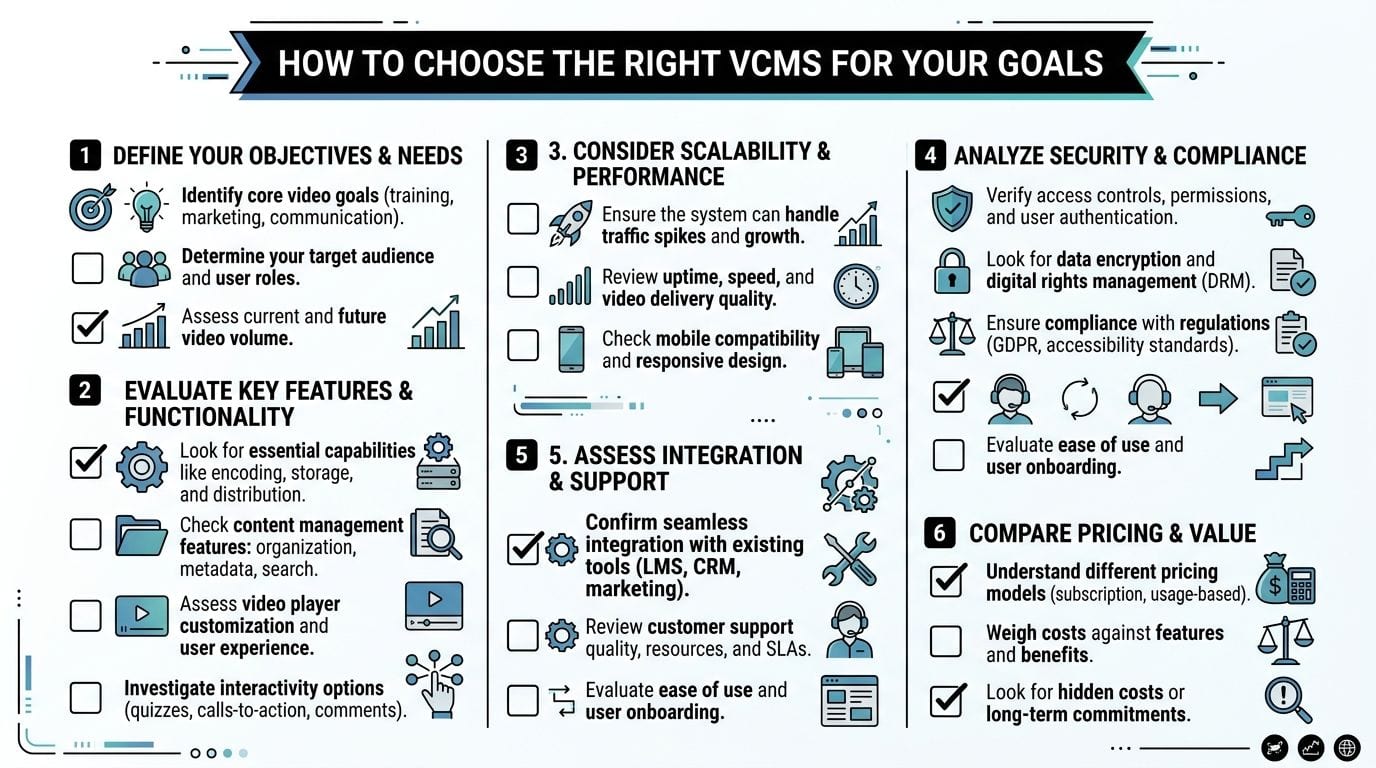
How to Choose the Right VCMS for Your Goals
Many buyers make the same mistake. They compare video platforms as if they all solve the same problem. They don't.
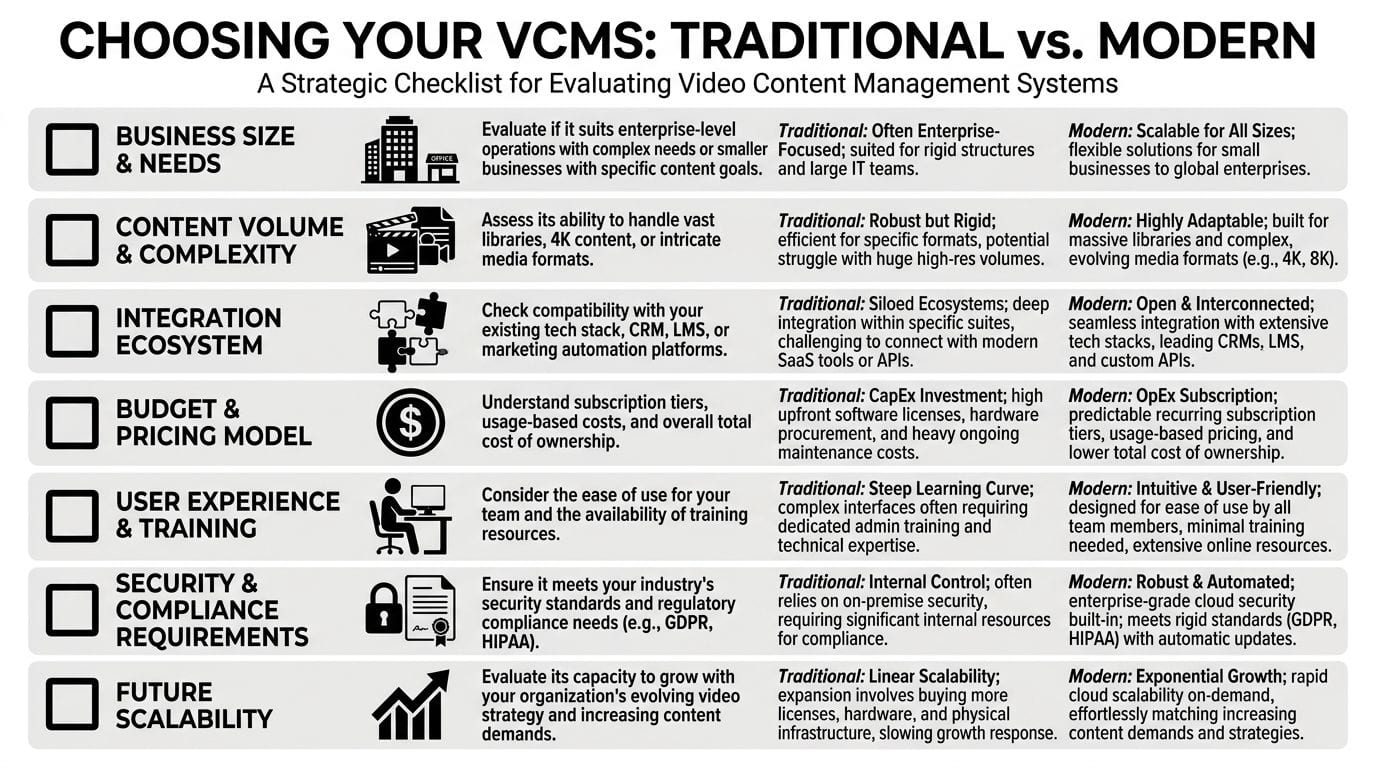
Some systems are built for enterprise governance. They focus on storage, permissions, internal communication, and secure distribution. Others are built for creators and marketers who need speed, repurposing, captions, and social publishing. Both may call themselves a video content management system. Only one may fit your actual workflow.
Start with the job you need the platform to do
The most useful dividing line is simple:
| If your priority is... | You likely need... |
|---|---|
| Archiving, access control, internal hosting | A traditional enterprise-style VCMS |
| Clipping, subtitling, repurposing, social distribution | A creator-focused VCMS or unified video workflow platform |
That distinction matters because buyer priorities have changed. A 2025 Forrester report found that 68% of digital creators prioritize AI repurposing capabilities over storage security when choosing video platforms. Many guides still overemphasize archival features, which can push creators toward systems designed for a different job entirely.
Questions that reveal the right fit
Instead of starting with vendor demos, start with these questions.
Are you trying to preserve content or produce more from it
If your main need is safe storage, permissions, and a controlled internal library, traditional VCMS tools make sense. If your goal is to turn a webinar, podcast, or interview into a week's worth of short-form content, you need a platform that treats repurposing as a first-class workflow.
Does your team publish natively to social platforms
A lot of legacy systems end at hosting. They assume another tool will handle scheduling and social distribution. That's fine for internal comms teams. It's frustrating for marketers and creators.
If your work lives on TikTok, LinkedIn, Instagram, YouTube, and X, ask whether the platform supports that reality or forces you back into copy-paste workflows.
How much technical complexity can your team tolerate
A powerful system that needs heavy setup often creates a hidden adoption problem. Non-technical teams stop using it. Then the “system” becomes another locked cabinet controlled by a small group.
Look for interfaces your editors, marketers, and content managers can work with without needing constant help from operations or IT.
Does it help you move from long form to short form
Many selection guides are weak in this regard. They explain security and storage well, but they don't ask whether the platform can identify clip-worthy moments, generate subtitles, or support fast reformatting for vertical channels.
For creators, coaches, and B2B marketers, that gap is huge. A library that stores video is useful. A system that helps create more publishable assets from the same source video is far more valuable.
Buy for the workflow you repeat every week, not the one that sounds most impressive in a feature comparison.
Measuring the ROI of Your Video Management Strategy
The return on a video content management system isn't just more views. It often shows up first in saved time, faster publishing, better reuse, and fewer workflow handoffs. If you only measure video ROI by top-line performance metrics, you'll miss why an organized system changes output.
Look beyond views
Three practical ways to think about ROI are:
- Content velocity. How quickly can your team move from raw footage to published assets?
- Repurposing ratio. How many usable pieces do you create from one core recording?
- Workflow efficiency. How much manual effort disappears when storage, editing support, captions, scheduling, and analytics connect?
These aren't vanity metrics. They affect labor, consistency, and how often your team can show up in market.
For teams trying to tighten their production process, these video marketing best practices for streamlined content creation are useful because they connect operational habits to output quality.
Count the cost of workflow gaps
The biggest ROI mistake is comparing only subscription prices. That ignores total cost of ownership, which includes all the extra time and tool-switching your team absorbs when the workflow is fragmented.
Recent 2025 data from the Content Marketing Institute shows that teams using disconnected tools spend an average of 14 hours per week manually stitching workflows and data, compared with 4 hours per week for teams on unified platforms.
That gap matters because “cheap” tools often become expensive through operational drag. A separate host, scheduler, transcript app, analytics dashboard, and approval chain may look manageable on paper. In practice, they create delays, duplicated effort, and reporting headaches.
A quick ROI check can look like this:
| Area | Fragmented workflow | Unified workflow |
|---|---|---|
| Finding source footage | Search across drives, chats, and folders | Search in one system |
| Creating captions and clips | Use extra tools and export steps | Handle inside the same workflow |
| Publishing | Manual uploads across channels | Centralized scheduling or delivery |
| Performance review | Pull reports from separate places | Review from a connected dashboard |
A platform becomes profitable long before it increases revenue if it removes repeated manual work from every publish cycle.
The hidden savings are often the most durable ones. Less tool switching. Fewer missed assets. Less rework. Faster turnaround from idea to post.
Conclusion From Video Library to Video Engine
The old mental model of a video content management system is too narrow. It treats video as something to store, protect, and occasionally retrieve. That still has value, especially in large organizations. But it misses how creators and marketers work now.
Instead of a digital warehouse, teams need a system that helps them create, repurpose, publish, and learn from video without piecing together five disconnected tools.
That's the fundamental shift. A modern VCMS isn't passive. It's active. It should help you find the exact moment worth clipping, turn long-form content into multiple assets, push those assets into the right channels, and show you what earned attention.
If your current setup still depends on scattered folders, manual exports, separate subtitle tools, and last-minute scheduling, the bottleneck probably isn't your creativity. It's your system.
A useful next step is simple. Audit your last three videos.
Ask:
- Where did files get lost or duplicated
- Which steps required manual handoffs
- How long did it take to turn one recording into multiple assets
- Could your team easily find and reuse that content today
Those answers will tell you whether you have a video workflow or just a collection of files.
The teams that win with video don't only make more of it. They manage it better. They choose systems built for the kind of work they repeat. And they treat their video library not as storage, but as a reusable engine for growth.
If your workflow depends on turning long videos into short clips, adding captions, scheduling across channels, and tracking results in one place, quso.ai is worth exploring. It's an all-in-one social media AI platform built for creators, coaches, marketers, and teams that want a connected video workflow instead of a scattered tool stack.